- Magestic's Newsletter
- Posts
- Why you should be using Atomic Design
Why you should be using Atomic Design
Chemistry?? ... in UI/UX?!

Karina Minanov
October 13, 2023
Story time! Grab a hot beverage and cozy blanket (or don’t … I can’t tell you what to do).
So a little while back, I interviewed for the lead design position at a fairly successful seed startup. The process included a design challenge aka I was given a week to build out a new tab for their existing mobile app. Considering the time crunch, I was pretty proud of what I submitted (47 interactive frames, plus a playable prototype). Spoiler alert, they weren’t impressed …
When I finally met face-to-face with the founder to discuss my submission, I was in for a rude awakening. Though I had created a component library for consistency purposes, the kind of meticulous design hierarchy he was looking for was wholly absent. “We’re all about atomic design here,” he said … my eyes widened, “Yeah … of course … me too … I totally know what that means …”
My personal deficiencies aside, atomic design isn’t all that new. Brad Frost coined the term in 2013, and for those of you who are mathematically challenged, that was 10 years ago. The year 2013 had a lot going for it: the dawn of Vine, self-serve froyo, Obama’s second inauguration, galaxy jeggings. What it didn’t have? Superpowered software capable of building design systems at scale. Ironically, Frost debuted his methodology when there was (little to) no software capable of bringing it to life.
For many reasons, most of us are thankful to have escaped the early 2010s. For one, I’m no longer in middle school; for two, you’re not reading this on Tumblr. That being said, as design tools continue to evolve and the line between designer and dev becomes evermore blurred, we’re placed in a position where we constantly have to relearn to stay relevant. These days, “AI” and “atomic design” are inescapable buzzwords … so let’s manipulate them in our favor.
⚛️ What is atomic design?
Atomic design is a methodology that involves breaking down user interface components into smaller, reusable elements (atoms) and systematically combining them to create cohesive and scalable design systems. For my fellow foodies out there, I like to think of it as UI/UX mise en place: if you measure and chop your tomatoes, onions, and garlic (design your icons, CTAs, text padding) before you turn on the stove (start designing an interface), it becomes a hell of a lot easier to make a bangin’ marinara (design a successful interface).
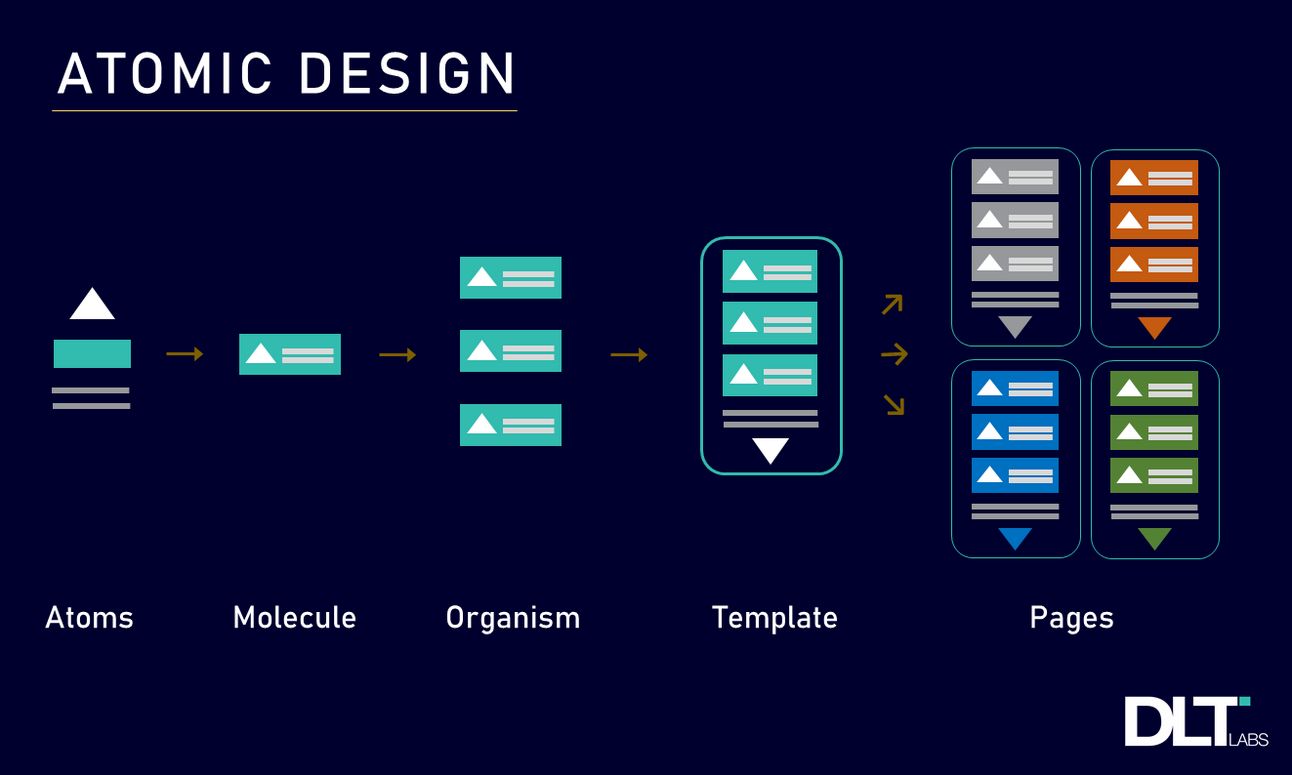
TLDR, atomic design can help you streamline your creative process, boost your efficiency, and is all-in-all the industry standard when it comes to building out digital products that scale. Plus, it’s a good term to flex when networking and/or interviewing for a high profile job (learn from my mistakes … I beg of you).
🔌 Featured plugins
Design System Organizer: bulk swap instances and styles between master components with the same name (aka get rid of long, confusing component labels like “home/icon/small/filled”)
EightShapes Specs: automate page layouts using selected components, instances, and frames (simplify multi-column layouts, annotate padding with pixel values, and compare attributes across variants)
Table Creator: create custom tables that easily resize to fit content (plus, publish global updates across multiple tables)
Design Lint: quickly locate missing styles and values within your designs
Instance Finder: find and search all instances of a specific component
☕ Pop quiz 2.0